ProjectSend: the public links a client was never meant to see
GHSA-g9g5-qxp7-f7v2: in ProjectSend a client could read and revoke the public links staff had created on the client's own files. What Liam Giannini of Webcracy found and why you should update to 2.8.0.
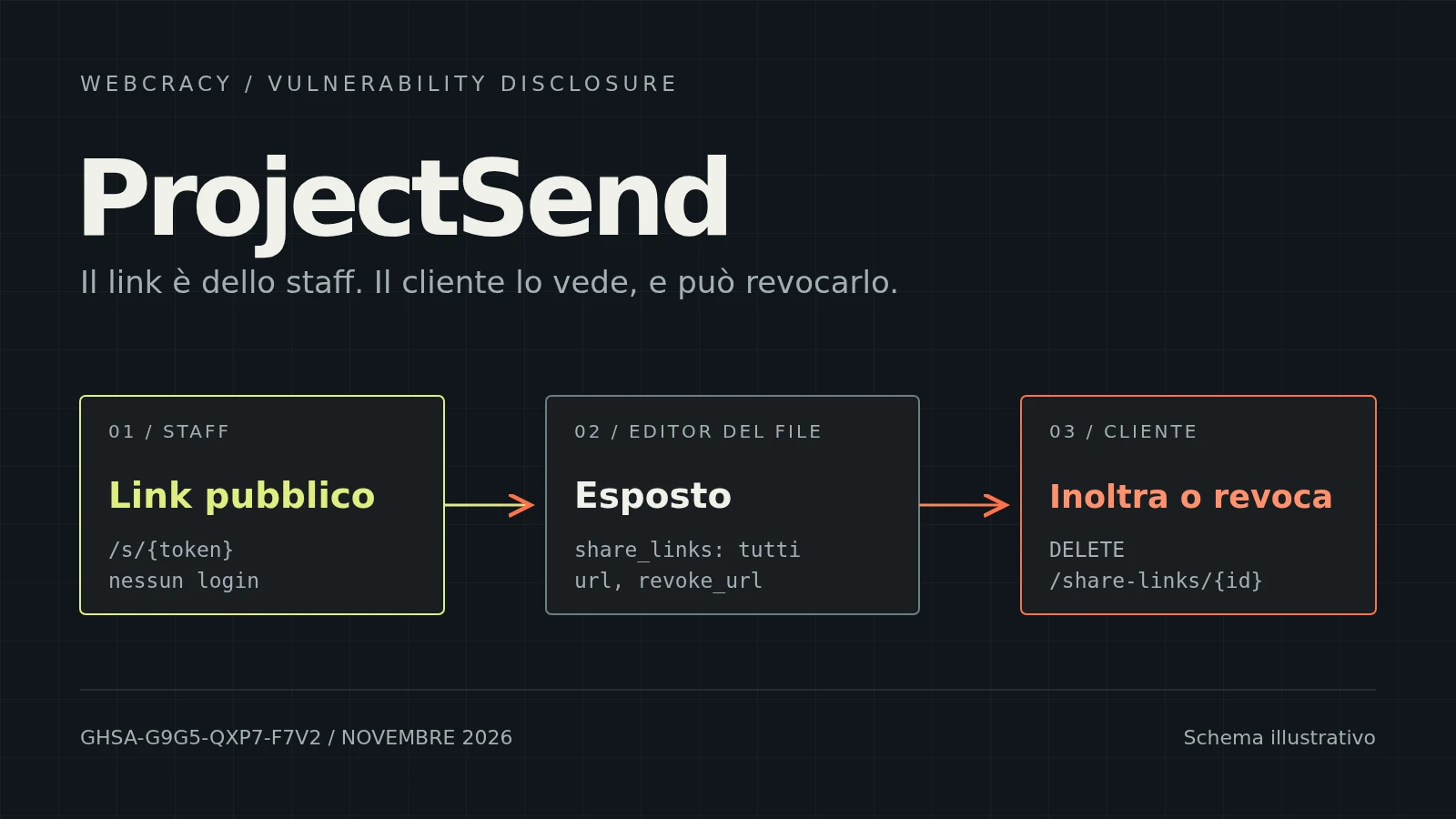
Plenty of firms, agencies and small businesses exchange documents with their clients through a portal: the client uploads their files, staff review them, and sometimes share them with third parties through a public link. Who can create that link, and who can see it, is a deliberate decision. In ProjectSend, a client without permission to publish files should not be able to hand out a public link. Yet by opening the edit page of one of their own files, they could read the full links staff had created on that file, and delete them too.
This is the flaw described in advisory GHSA-g9g5-qxp7-f7v2, published on 8 November 2026 and fixed in ProjectSend 2.8.0. We reported it: the discovery is by Liam Giannini (Liam-G on GitHub), ethical hacker and co-founder of Webcracy. Our thanks to the ProjectSend maintainers, who shipped the fix in the release that followed our report.
Webcracy and cybersecurity
Besides building websites and applications, Webcracy works in cybersecurity: penetration tests, code review, configuration analysis and research on the open source software that we and our clients use. Liam works as an ethical hacker: he looks for flaws the way an attacker would, but in order to get them fixed. He reports them privately to the maintainers and only makes them public once a fix is available. It's the same responsible disclosure process we followed for exarch and FreeScout.
What public links are in ProjectSend
ProjectSend is one of the most popular and widely used open source applications for sharing files with clients from your own server: it has been around since 2014, has more than 2,000 stars on GitHub, and the LinuxServer.io Docker image alone has passed 4.9 million downloads. It's written in PHP, on Laravel. With a project this widespread, a flaw is never a problem for just a few. Each file can have one or more public links, addresses of the form /s/{token} that anyone who has them can open without logging in. The token works like a key: whoever has the link gets in, no further checks. That's why the ability to create one is a separate permission, upload_public, which the administrator can grant or deny for each role.
ProjectSend already had a clear rule about who sees what: in the portal, a client only sees the public links they created themselves. If staff create a link on a file the client uploaded, for example to send it to an outside consultant, that link doesn't show up in the client's file list. The code enforced this rule explicitly, and there was even an automated test checking it.
Where the rule wasn't applied
The problem lay in two places that used a weaker rule for the same object.
The first was the file editor. A client with the edit_files permission can edit the files they uploaded. When they opened the edit page, the server rightly checked that they could edit that file, but then sent the browser all the attached public links, without filtering by author. For each link it included the full address with the token, the identifier and the URL to revoke it. Looking at the page data was enough to get hold of the link staff had created.
The second was revocation. The request that deletes a link again checked only the edit permission on the file, not who had created the link. So the client could delete a staff link, and whoever had received it suddenly found themselves locked out.
In both cases the mistake is the same, and it's a very common one: confusing permission on a resource with permission on everything attached to it. Being able to edit a file doesn't mean being able to manage every link other people have created on that file.
How serious is it
No access to other people's files, no staff privileges: the issue only affects files the client uploaded themselves, and it requires staff to have created a public link on them. But within that perimeter, two staff decisions went out the window. A client who had been denied permission to publish could still hand anyone an active public link that opens the file without logging in. And they could revoke a link staff had given to third parties, cutting off a share someone else had decided on. The advisory rates the issue as moderate severity, under CWE-862, missing authorization, and CWE-200, exposure of sensitive information. In our report we had estimated a CVSS 3.1 score of 5.4.
Affected versions are 2.5.0 through 2.7.1.
How we verified it
The issue came up while reading the code of ProjectSend 2.7.1 and comparing the different paths that lead to the same links: the portal list, the file editor and revocation. The list filtered by author; the other two didn't.
To confirm it, Liam wrote four automated tests using the project's existing test tooling, run in an isolated Docker container with an in-memory database and dummy accounts. The tests check that the editor exposes the staff link, that the client can revoke it, that the portal list on the other hand correctly hides it, and that the link obtained works even without logging in. Two existing tests served as controls: a client without upload_public cannot create public links, and cannot revoke links on files that aren't theirs. The behaviour was also confirmed on the main development branch.
The fix in 2.8.0
The 2.8.0 release notes, published on 29 October, sum it up in one line: a client's file editor now shows and revokes only the public links created by that client. It's the same rule the portal already applied, extended to the two places where it was missing. Staff permissions stay as they were.
The same release closes several other authorization issues: API tokens that could do more than they had been granted, prepared zips that remained downloadable after access to a file was lost, uploads ending up in folders the user was no longer allowed to use, and more. That alone is reason enough not to put off the update.
What to do if you use ProjectSend
If your installation is between 2.5.0 and 2.7.1, update to 2.8.0 or later. Read the "do these yourself" section of the release notes first: some API tokens need to be recreated to keep the same functions, and custom email templates using Markdown are now shown as plain text.
After updating, it's also worth reviewing the public links staff have created on files uploaded by clients. If a link was shared with outside people and the client shouldn't have known about it, the update doesn't make it secret after the fact: the fix is to revoke it and create a new one. And if a staff link vanished for no apparent reason, you now know one possible cause.
More generally, a client portal holds contracts, invoices, identity documents. It deserves regular updates and a periodic review of roles: who has edit_files, who has upload_public, and whether they really need it.
Why we do research on open source software
We often recommend self-hosted open source tools like ProjectSend: the data stays on your own server, there are no per-user fees, the code can be read. But someone has to actually read it, with the eye of someone looking for the spot where two parts of the program apply different rules to the same thing. Problems like this don't surface when you use the application normally: they surface when you compare the code. Reporting them to the maintainers is our way of giving something back to these projects, and of knowing exactly what we install for our clients.
If you use a client portal, a business management system or a custom application and want to know whether the permissions really do what they promise, we'd be glad to talk. Our penetration testing work starts right here: reading the code and the configuration, finding where a check is missing, and telling you precisely what we verified and what we didn't.
HAVE A PROJECT?
Let's discuss how we can help your business with custom digital solutions.
CONTACT US